
Android? Ja – Android!
So funktioniert es unter Android

Blick → Bewegen. Verweilen → Auswählen.
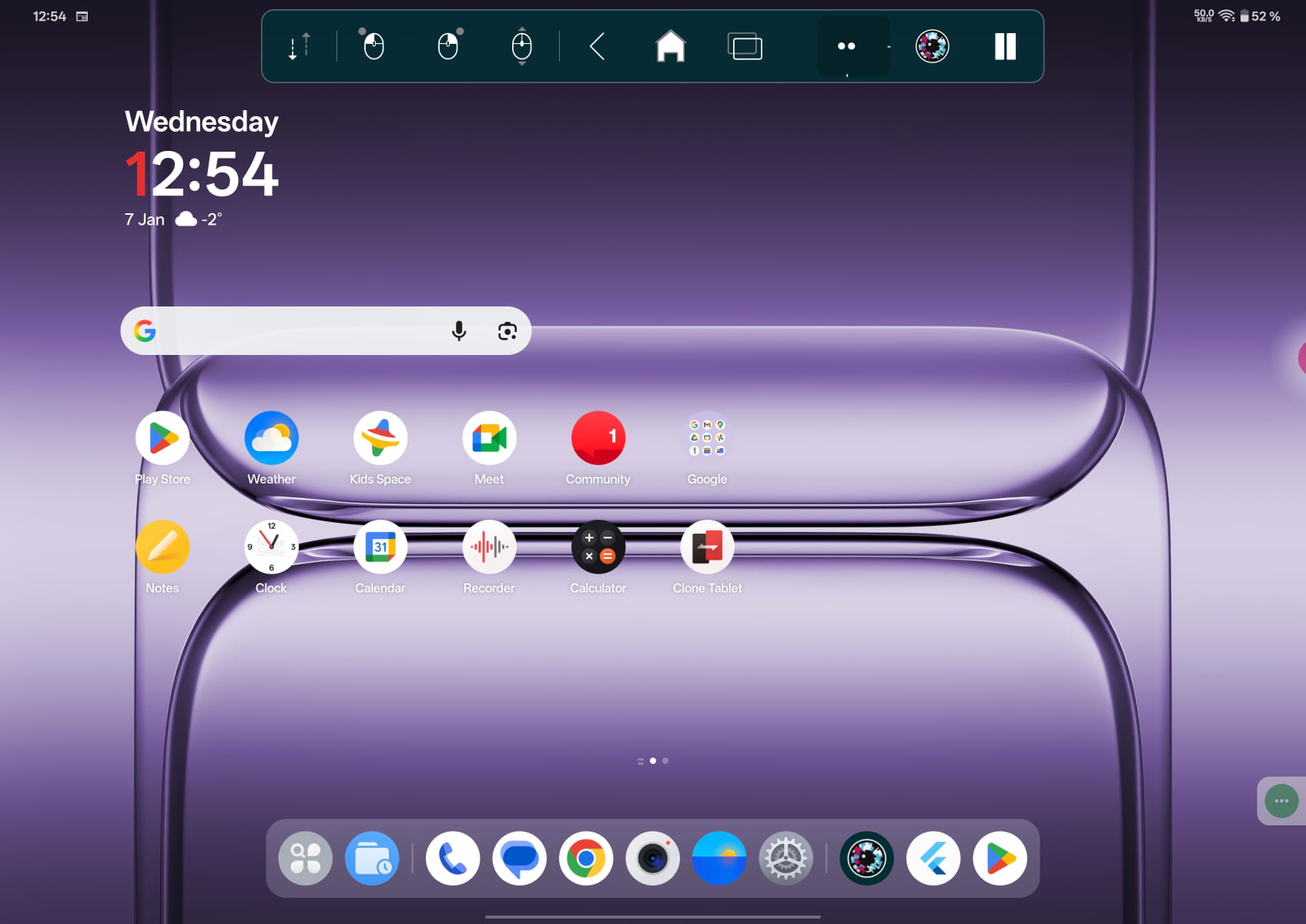
Die Menu Bar bietet Android-spezifische Aktionen wie Tippen und Halten – so lassen sich Aktionen per Blick ausführen.
Funktioniert im gesamten Betriebssystem: Home-Bildschirm, App-Übersicht, Einstellungen, Benachrichtigungen, Web oder E-Mail.
Keine App-Bindung: Eine Vielzahl touch-basierter Apps lässt sich nutzen; das Verhalten kann je nach App-Design und Android-Version variieren.
Was damit möglich ist
Mit Skyle lässt sich Android wie gewohnt nutzen – einfach mit den Augen.
Apps öffnen und wechseln, Aktionen bestätigen, Text in Felder eingeben, im Web surfen und E-Mails schreiben – alles freihändig. Da Skyle direkt im Betriebssystem arbeitet, ist der Einarbeitungsaufwand gering und gewohnte Arbeitsabläufe bleiben erhalten.
Kompatibilität
Empfohlenes Gerät: OnePlus Pad 3. Für ein unkompliziertes Setup direkt nach dem Auspacken empfiehlt sich das OnePlus Pad 3 (USB-C). Skyle funktioniert darüber hinaus mit einer Vielzahl von USB-C-Android-Tablets. Einfach das Gerät nennen – wir schlagen die passende Halterung und Stromversorgung für ein sauberes, zuverlässiges Setup vor.
Stromversorgung & Alltag
Skyle für Android kann direkt über das Tablet per USB-C betrieben werden. Das hält das Setup schlank: ein Kabel, ein Gerät. Wenn das Tablet nur begrenzt Strom liefert – oder der Akku geschont werden soll – lässt sich Skyle auch extern mit Strom versorgen. So kann das Tablet gleichzeitig genutzt und geladen werden.
Für gleichzeitiges Nutzen und Laden – auch mit nur einem USB-C-Anschluss – stehen Companion oder Companion light zur Auswahl.
Nein. Skyle funktioniert unter Android systemweit;
Apps können sich je nach Design unterschiedlich verhalten.
Ja, unter Android (und Windows). Für das iPad ist es nicht verfügbar.
Ja – mit Companion light (externe Stromversorgung) oder Companion (integrierte Powerbank).
Tippen und Halten sowie App-Umschalter und Home per Blick. Weitere Aktionen hängen von Android-Funktionen und App-Unterstützung ab.
Warum sollte ich Skyle integrieren?
On-Chip-Verarbeitung für die volle Leistung der eingesetzten Geräte

Skyle 3 für Android
Die ultimative AI-Tracking-Plattform
Erlebe unvergleichliche Präzision und Leistung mit den innovativen KI-Modellen von Skyle. Unsere firmeneigene Technologie gewährleistet eine exakte Gesichts- und Merkmalserfassung in Echtzeit und bereichert deine Projekte mit:

Erweiterte Edge-KI- und NPU-Funktionen
Erlebe robuste Leistung und effiziente geräteinterne Verarbeitung.

Verbesserte Funktionen der dritten Generation
Die Tracking-Box ist 5x größer als bisher und bietet eine größere Reichweite und Flexibilität.

Hervorragende Bildrate
Erreiche bis zu 5x mehr Bilder pro Sekunde für ein flüssigeres, reaktionsschnelleres Tracking.

Präzise Merkmalserkennung
Profitiere von fortschrittlichen Techniken zur genauen Erkennung von Pupillen und Augenmerkmalen.

Niedrige Latenzzeit
Minimale Verzögerung für nahtlose Echtzeitanwendungen.